
For you to watch videos on YouTube on your HarmonyOS device, you must first install it. To install the app, you should know where to get the right file for the YouTube download Huawei option. And to be able to download it, you must have the right platform to get it from. These are all steps that you have to take in order for you to watch YouTube videos on your Huawei device with HarmonyOS. You can go through the steps listed below to know how you can do it.
Steps for Downloading YouTube Using AppGallery
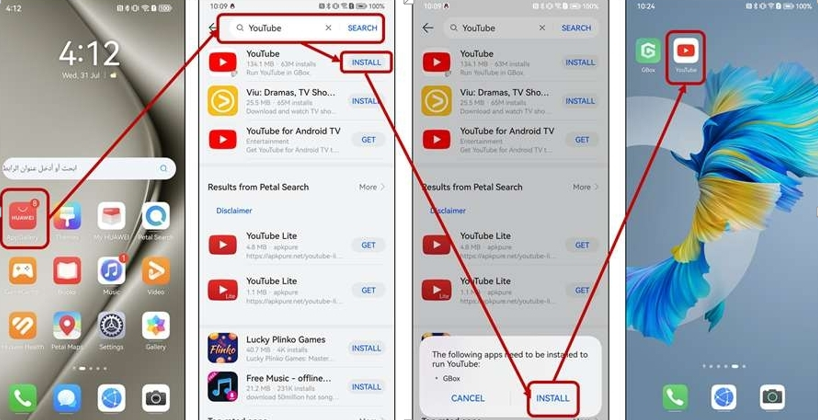
Go to AppGallery
You might not be familiar with the various apps that are already available if you are a first-time Huawei owner. The AppGallery is one such app that has almost everything you need, like the youtube download huawei installer file. When you go to AppGallery, you will be able to get the YouTube app. You can do this by either browsing the different categories on the app or by searching for it. AppGallery prioritizes data privacy for its device users, so you are guaranteed security with all your personal information. AppGallery also abides by international standards, which makes it a very capable app for you to use.
Install YouTube
To download and install the YouTube file on your device, choose “Install.” YouTube is not a native app on Huawei devices, so in order for it to work seamlessly, AppGallery will suggest other apps for you to download. Depending on the device model that you have, you will get installation options for microG and Google Box. The good thing about the YouTube installation on Huawei AppGallery is that the whole process comes with these recommendations. To download GBox or microG, you need to select “Install” as well. These extra installations have undergone the same AppGallery app inspection process, so you are sure that they are all safe to download and install.
Compatibility with Specific Devices
The first two steps are dependent on the Huawei software that your device has. If your HarmonyOS is version 4.0, like the MatePad, MatePad SE, MatePad Air, and MatePad Pro, you can download microG along with the YouTube app. If you have devices that have the earlier versions of HarmonyOS, then you need to download GBox. Both options are effective ways to run YouTube on Huawei. They are optimal solutions for your Google apps to work on your device. The best way to know which one to download is to try it out for yourself. AppGallery makes sure that you have all the tools and components that your device needs for Google apps to function smoothly.
See also: The Future of Lighting Technology: Inside COB LED Strip Innovation
Try YouTube on Huawei
You will see the YouTube icon on your home screen. You can select it to go to the YouTube interface. It looks similar to the way you can view it on other devices. Setting up YouTube is a breeze once you are in the app. You should log in with your personal details to go to your account. This will instantly bring you to your preferences based on your algorithm for viewing videos. You can also make some changes to the Settings of your YouTube app for better customization.
Conclusion
Huawei users will definitely benefit from having a YouTube download huawei available at AppGallery. Whatever your Huawei device is, you can still have fun watching millions of videos being uploaded every day. With the help of GBox and microG components, you are guaranteed to run YouTube on your device. AppGallery, with its compliance with international standards, will keep every downloadable app safe for users like you. You can see it for yourself and try it out. Do not forget to allow permission settings so that your YouTube app can work flawlessly on your device.